 Let’s
Let’sAppointments & walk-ins
Set service prices and durations, branch hours and barber availability. Manage bookings and your live queue.
LET’S FOR BUSINESS
Let’s Services brings your barbershop’s appointments, customers, stock and team into one workspace. Use your own logo, cover and colours.
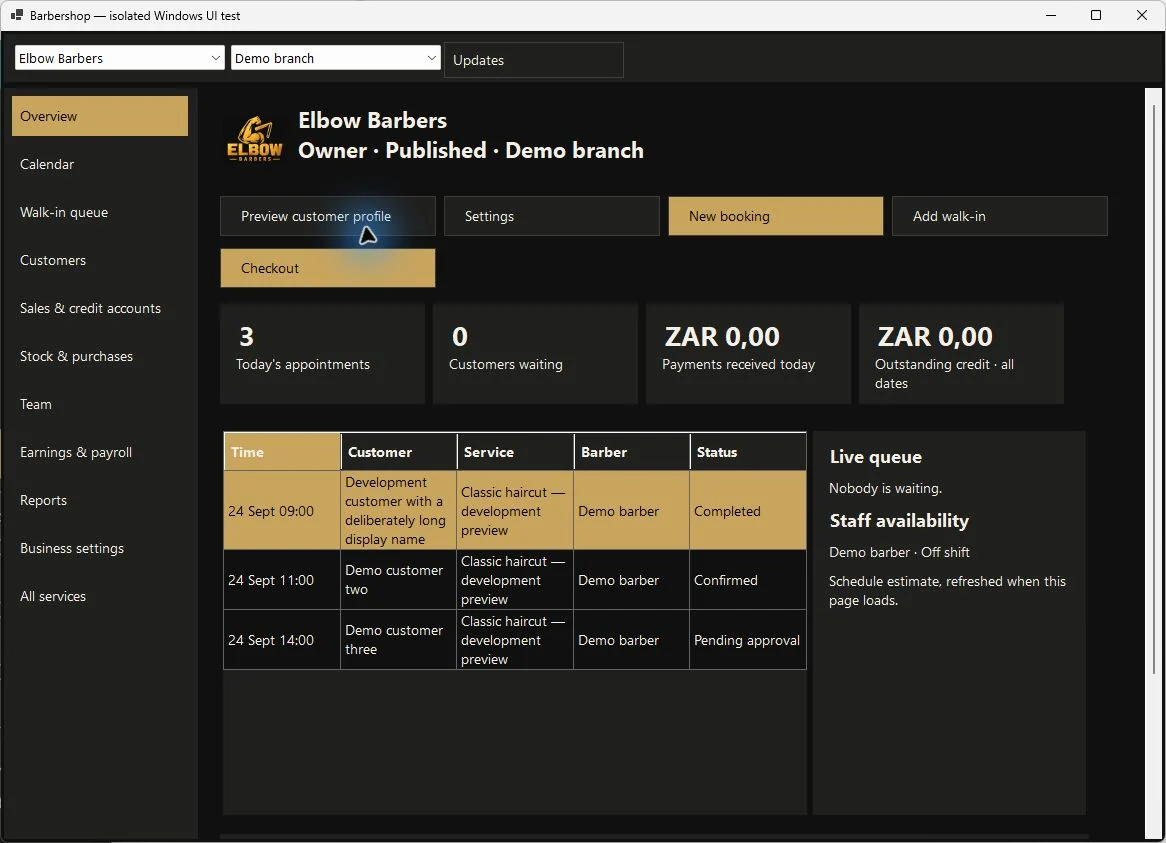
A WORKSPACE THAT FOLLOWS YOUR DAY
Set service prices and durations, branch hours and barber availability. Manage bookings and your live queue.
Keep customer records, record checkout payments and manage approved credit balances and repayments.
Record supplier purchases, receive stock and follow branch inventory and transfers.
Invite staff, choose their roles and branch access, and set bookable profiles and working hours.
Prepare staff earnings, review operational reports and record end-of-day cash-up.
Use your business logo, cover, slogan and colours. Preview your customer profile before publishing.
Payment tools record cash received or external payments; they do not process payments. Earnings preparation is not a statutory payroll service.
MAKE IT YOURS
Guidance for existing app users: business setup is inside Services in Android and Windows. This information website does not accept business registrations or bookings.
Use the same account to find participating shops in Services.